History
Every audit you ran with its score, and what you fixed, what is new and what is still open since the audit before, page by page.
Every audit you run is saved. "Audit history" lists them with their score, and "Since your audit of …" on the Audit tab tells you exactly what changed since the one before: what you fixed, what is new and what is still open.
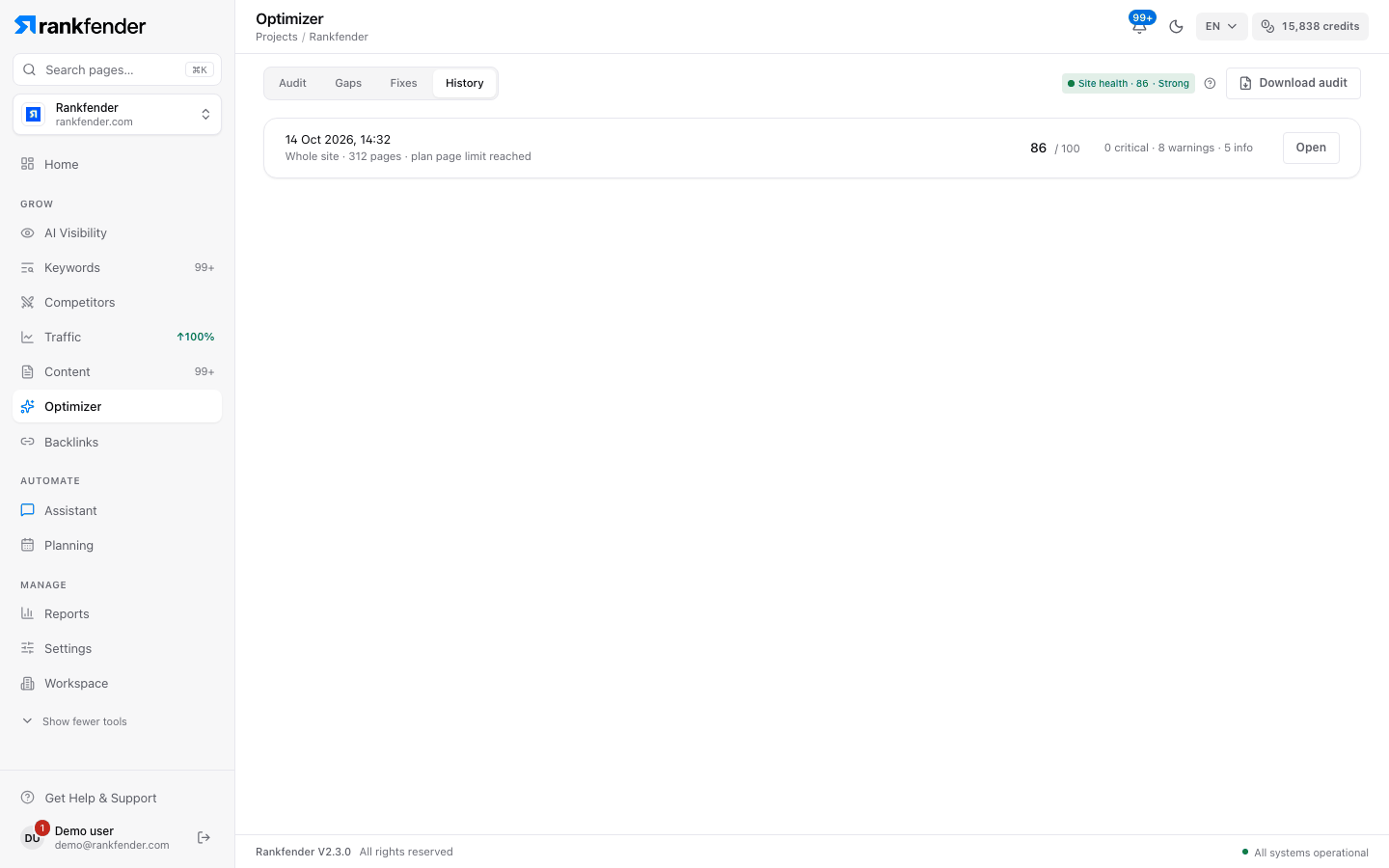
Audit history
The newest audit comes first. Each row shows:
| Item | Example |
|---|---|
| Date and time | 14 Oct 2026, 10:42 |
| What was audited | "Whole site · 48 pages" or "Single page · /pricing", plus "plan page limit reached" when the audit stopped at your plan's limit |
| Score and change | 72, with +6 against the audit before it |
| Issues | "2 critical · 9 warnings · 14 info" |
| Open | Shows that audit on the Audit tab |
"Open" loads the saved audit with the strip "You are looking at the audit of …" and "This is a saved audit, not your latest one." Click "Back to latest" to return. A very large audit may keep only its score and counts: "This audit was too large to store in full — its score and issue counts are in the list."
Since your audit of …
After each audit, the Audit tab compares it with the previous audit of the same kind (whole site or single page):
- the score change and a summary such as "5 fixed · 2 new · 11 still open",
- "N Planning tasks marked done" when fixes closed tasks,
- "Compared on the N pages both audits checked.",
- a "Fixed" list and a "New" list, with "Show all changes" for the rest.
| Line | What it means |
|---|---|
| "Fixed site-wide" | A site-wide issue (robots.txt, sitemap, llms.txt…) is gone. |
| "Fixed on N pages" | The issue disappeared from those pages. |
| "Fixed on N pages · M still affected" | A partial fix: other pages still have it. |
| "Site-wide" (under New) | A new site-wide issue appeared. |
| "On N pages" (under New) | The issue appeared on pages that did not have it. |
| "No change since that audit." | Nothing was fixed and nothing new appeared. |
How fixes are confirmed
- A page counts as fixed only if both audits read that page and the issue is gone from it.
- A site-wide issue counts as fixed only if both audits were whole-site audits.
- An issue on a page the earlier audit never read is not called a regression.
- A whole-site audit is compared with the previous whole-site audit, a single-page audit with the previous single-page audit.
Tasks added from Fixes are marked done in Planning when their issue is gone everywhere it was. Tasks already done are left alone, and a partial fix leaves the task open.
Tip
Keep "Whole site" for your before/after runs: it is the only mode that confirms site-wide fixes and updates the Site Health score on Home.