Answers
Every AI answer to your questions: whether you were named, your position, tone and sources, and how the visibility score of an answer is computed.
The "Answers" tab shows what the assistants actually said, question by question. Each check stores one answer per question and assistant; the next check replaces it with the new one. The labels on this tab appear in English in every language.
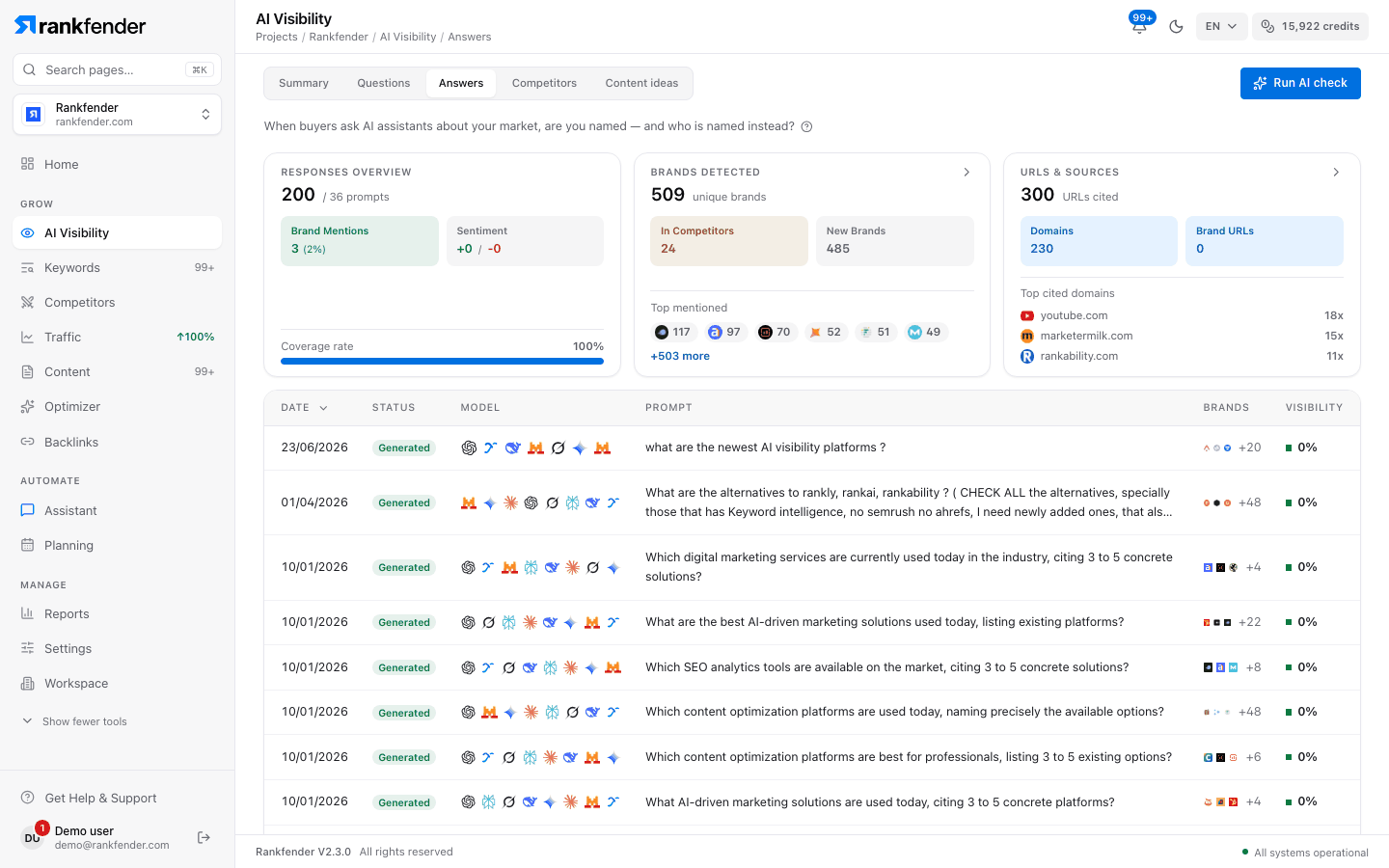
The three cards at the top
The cards count answers to questions without your name (all answers when every question contains it).
- "Responses Overview": "Brand Mentions", the "Sentiment" split (+ positive / − negative) and the "Coverage rate".
- "Brands Detected": brands found "In Competitors" (ones you track), "New Brands" and the "Top mentioned". Click to open "Brands Explorer": every brand with its mentions, the assistants that named it and the questions behind it, sortable by "Most Mentioned", "Most Prompts" or "Highest Visibility". From there you can add a brand to your competitors.
- "URLs & Sources": "URLs cited", "Domains" and "Brand URLs" (pages of your own site). Click to open the full list of cited pages, grouped by domain.
The list
| Column | What it shows |
|---|---|
| "Date" | When the question was created. Sortable. |
| "Status" | "Generated" (answers exist), "Pending" (not asked yet) or "Paused". |
| "Model" | An icon for each assistant that answered. |
| "Prompt" | The question. Rows with a question that contains your name are tinted. |
| "Brands" | Brands found in the answers. |
| "Visibility" | The average visibility score (below) of the answers to this question. Sortable. |
Read one question's answers
Click a row
"Response Details" opens with the question, its "Language", "Country" and "Created" date, and the "Brands Detected (All Responses)".
Read "AI Responses"
Each answer shows its assistant, "Web Search" when the assistant searched the web, its "Visibility" score, "Sentiment", "Position", up to three "Sources" and the full text. An answer to a question with your name carries the "branded" tag: "Excluded from organic visibility, position, and mention KPIs."
Ask again with "Generate Response"
Puts this one question to your selected assistants now, without waiting for the next check. It uses credits like a small AI check.
How each answer is read
| Measure | How it is computed |
|---|---|
| Named | The answer contains your full brand name, your domain, the domain without its ending or one of your other names, as a whole phrase. |
| Position | The brands found in the answer are ordered by where they first appear; #1 means you were named first. Only counted when you are named. |
| Sentiment | The words just around your name: recommendation words make it positive, criticism words negative, the rest neutral. The word list covers English and French. |
| Sources | The links the assistant returned, plus the web addresses written in the answer. |
| Competitors | The competitors you track whose name or domain appears in the answer. |
The visibility score of one answer
A score from 0 to 100. It is 0 when you are not named. Otherwise Rankfender multiplies four parts and caps the result at 100:
- Type of mention: clear recommendation 95, strong praise 82, positive 67, neutral 50, critical 30, very negative 15.
- Position: #1 counts 100 %, #2 85 %, #3 70 %, #4 50 %, #5 30 %, further down 20 %.
- Tone: positive 100 %, neutral 85 %, negative 50 %.
- Sources: × 1.15 when the answer cites sources.
Example: a neutral mention, named second, with sources: 50 × 0.85 × 0.85 × 1.15 ≈ 42.
Note
This score ranks answers. Your headline AI visibility on Summary is simpler: the share of answers that name you at all.