Library
Every article in one list: the six filters, statuses, the QC and Index columns, row actions, article details and multi-select.
Content › Library lists every article of the project, newest change first, with articles being written at the top. Type in "Search blog posts..." to filter by title or keyword. Click a title to open the article in the Writer; click anywhere else on the row to unfold its details.
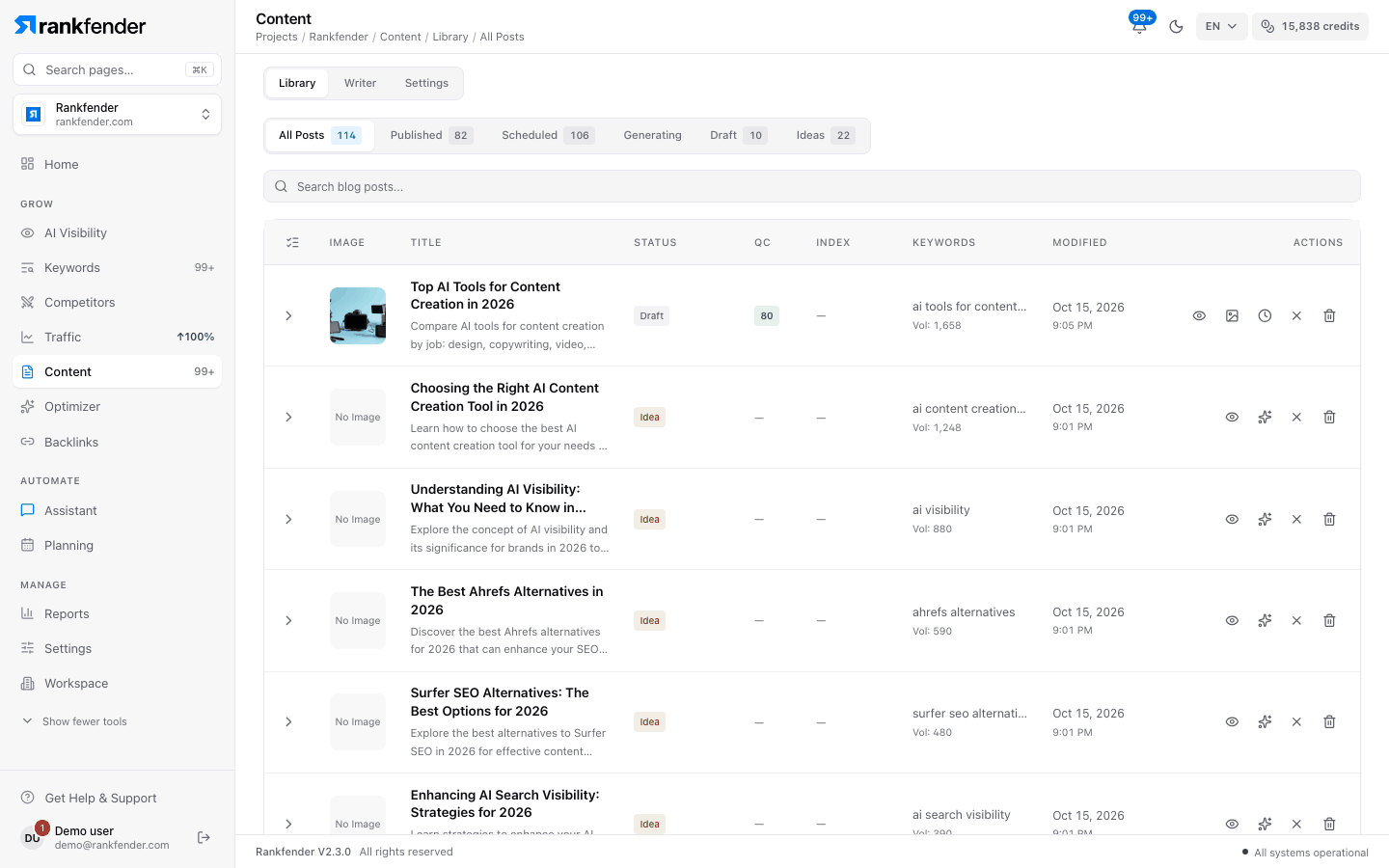
Filters
| Filter | Shows |
|---|---|
| All Posts | Every article. |
| Published | Articles sent to your site. |
| Scheduled | Every article with a date in the calendar, whatever its status (an idea with a date shows here too). |
| Generating | Articles being written right now. |
| Draft | Written articles that are not published. |
| Ideas | Planned articles that are not written yet. |
Columns
| Column | What it shows |
|---|---|
| Image | The featured image, or "No image". |
| Title | The title, with the meta description under it. |
| Status | Idea, Draft, Scheduled, Generating... or Published. |
| QC | The quality score out of 100: green from 80, amber from 60, red below 60 or when the check failed. "—" for ideas. |
| Index | For published articles only: Indexed, Pending, Failed, Skipped or Not sent (Google indexing request). |
| Keywords | The target keyword and its monthly searches. |
| Modified | Date and time of the last change. |
| Actions | The buttons below. |
The QC score and its reasons are explained in Quality review and the publish gate. The Index column fills in when Auto-index on Google is on (Professional and above).
Row actions
- View (eye): open the article in the Writer.
- Generate Content (sparkles, ideas only): write the article now.
- Generate Image or Regenerate Image (drafts only): make a new featured image.
- Schedule (clock, drafts only) and Unschedule (cross, dated articles): put it on, or take it off, the calendar. A day holds 1 article on Essential and 2 on Professional and above; a full day shows "Day is Full".
- Delete (bin): remove the article after a confirmation.
You only see the buttons your role allows (Admin, Editor or Viewer).
Article details
Click a row to unfold it:
- Title in full, with the meta description.
- Published URL (published articles), or "No URL recorded".
- Content: status, publication date, platform, word count and slug.
- Keyword: target, volume, difficulty, competition and up to 8 secondary keywords.
- Quality: QC Score (for example 82.0 / 100), QC Status and Indexing. Ideas say "Not yet generated — quality will be scored after generation."
- QC Score Breakdown: Keywords, Structure, Readability, Content and Brand, each with its points.
- Recommendations: what would raise the score.
Work on several articles
Click the list icon at the left of the header ("Select articles") to show checkboxes. With articles selected, a bar offers Schedule All, Publish All and Delete All. Publish All only marks the selected articles as Published in Rankfender; it does not send them to your site. To send an article, use Publish in the Writer.
Note
An article that has been "Generating" for more than 20 minutes is released automatically when you open the Library, so you can write it again.