Summary
Your AI visibility at a glance: how it is computed, who is named instead, sources, tone, and results by assistant, topic, buyer profile and stage.
"Summary" is the first tab of AI Visibility. It reads every answer Rankfender has collected for the project and shows, card by card, how often you are named, who is named instead, and where. It shows the same numbers as the "AI answers" card on Home. The tab fills in after the first AI check.
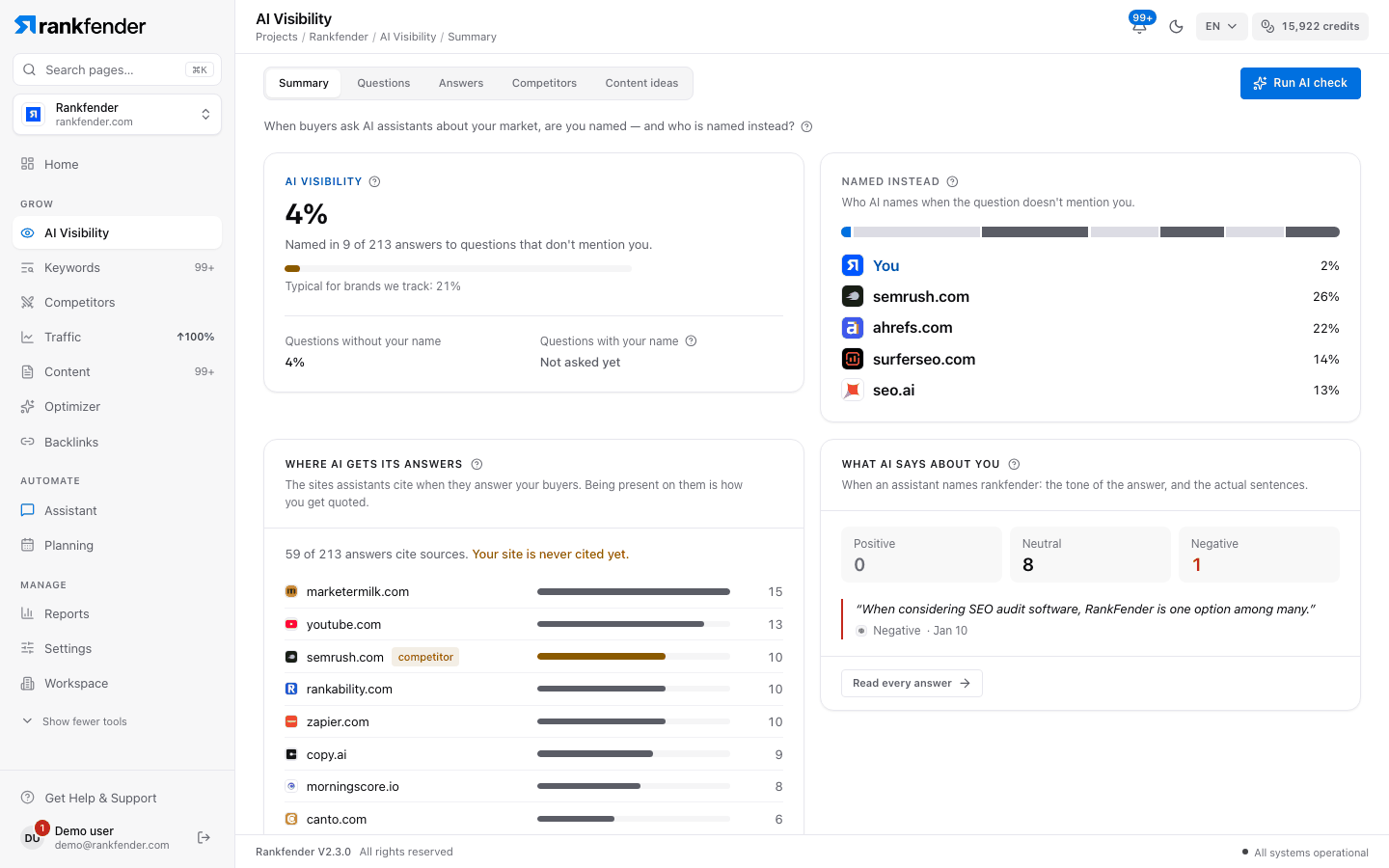
"AI visibility"
The headline number. Rankfender takes every answer to a question that doesn't contain your name and counts the ones that name you anyway: "Named in 3 of 25 answers to questions that don't mention you." The percentage is that count divided by those answers. Below 10 answers it shows "3 of 7" instead of a percentage ("Too early for a score").
- "Typical for brands we track: 21%": the same rate measured across brands that Rankfender tracks, as a point of comparison.
- "Questions without your name" and "Questions with your name": the two rates side by side. Expect close to 100 % on questions with your name; that number is not part of the score. "Not asked yet" means no answer exists for that group.
- "We can't measure this yet": every question contains your brand name. Use "Add a question without my name", or correct a question's "Names you" tag on the Questions tab.
"Named instead"
"Who AI names when the question doesn't mention you." On answers to questions without your name, each other brand named in an answer counts once for that answer. The bar shows "You" and the six brands named most often, each as a share of all those mentions. "See your competitors" opens the Competitors tab.
"Where AI gets its answers"
The sites the assistants cite when they answer, from every answer (with or without your name). The card says how many answers cite sources ("12 of 40 answers cite sources.") and whether "Your site is cited in …". It lists the ten sites cited most, tagged "you" or "competitor". Sites that are neither, such as forums, directories, videos and reviews, are places to get listed or mentioned.
"What AI says about you"
The tone of the answers that name you: "Positive", "Neutral" or "Negative", with up to three quotes (negative ones first). Rankfender reads the words just before and after your name. Recommendation words ("I recommend", "best choice", "excellent", "reliable") make it positive; criticism words ("expensive", "limited", "drawback", "avoid") make it negative; anything else is neutral. The word list covers English and French. "Read every answer" opens the Answers tab.
"By topic", "By buying stage" and "By buyer profile"
The same AI visibility, split three ways, always on questions without your name. Each row shows "Answers" and "Named"; a line such as "2 of 8 never name you yet" counts the rows where you were never named. "Get content ideas" opens Content ideas Professional and up.
| Card | Rows come from |
|---|---|
| "By topic" | The topic attached to each question. |
| "By buyer profile" | The buyer type the question was written for. |
| "By buying stage" | The question's intent, grouped in five stages: "Learning", "Solving a problem", "Comparing options", "Checking a choice", "Ready to buy". When 10 or more answers exist at "Ready to buy", the card says how often those buyers hear about you. |
"By AI assistant"
One row per assistant that has answered: "Status", "Answers" and "Visibility". Here the rate covers all your questions, with and without your name. "Answering" means an answer arrived in the last 14 days; otherwise the status reads "No answer since …". Below 10 answers the rate shows as named / answers, for example "2/6".
Note
Rankfender asks up to 8 AI assistants: ChatGPT, Claude, Gemini, Perplexity, DeepSeek, Grok, Llama and Mistral. How many depends on your plan (Essential 5, Professional 7, Business and Agencies all 8) and on the assistants you select in "Monitoring Settings". Perplexity answers with live web sources.
"Over time"
AI visibility per week (weeks start on Monday), on questions that don't mention you. The chart appears after the third weekly check; until then it says when the next check is due. Filter by assistant once an assistant has two weeks of data. Hollow points rest on fewer than 10 answers: a hint, not a result.
Questions you lose and win
If some questions have never been put to an assistant, a card says so ("You can't win a question nobody asked") with "See the questions". Below it, "Questions you lose" and "Questions you win" work exactly as on Home; see Organic search and AI answers.
The footnote
The last line says how much was measured and how fresh it is: "Measured on 28 of 30 questions across 5 assistants, last checked 2 days ago." Assistants give slightly different answers each time, so trust the direction over several checks rather than one value.