Rankings
Google Search Console clicks, impressions, CTR and average position for the searches where your site already appears.
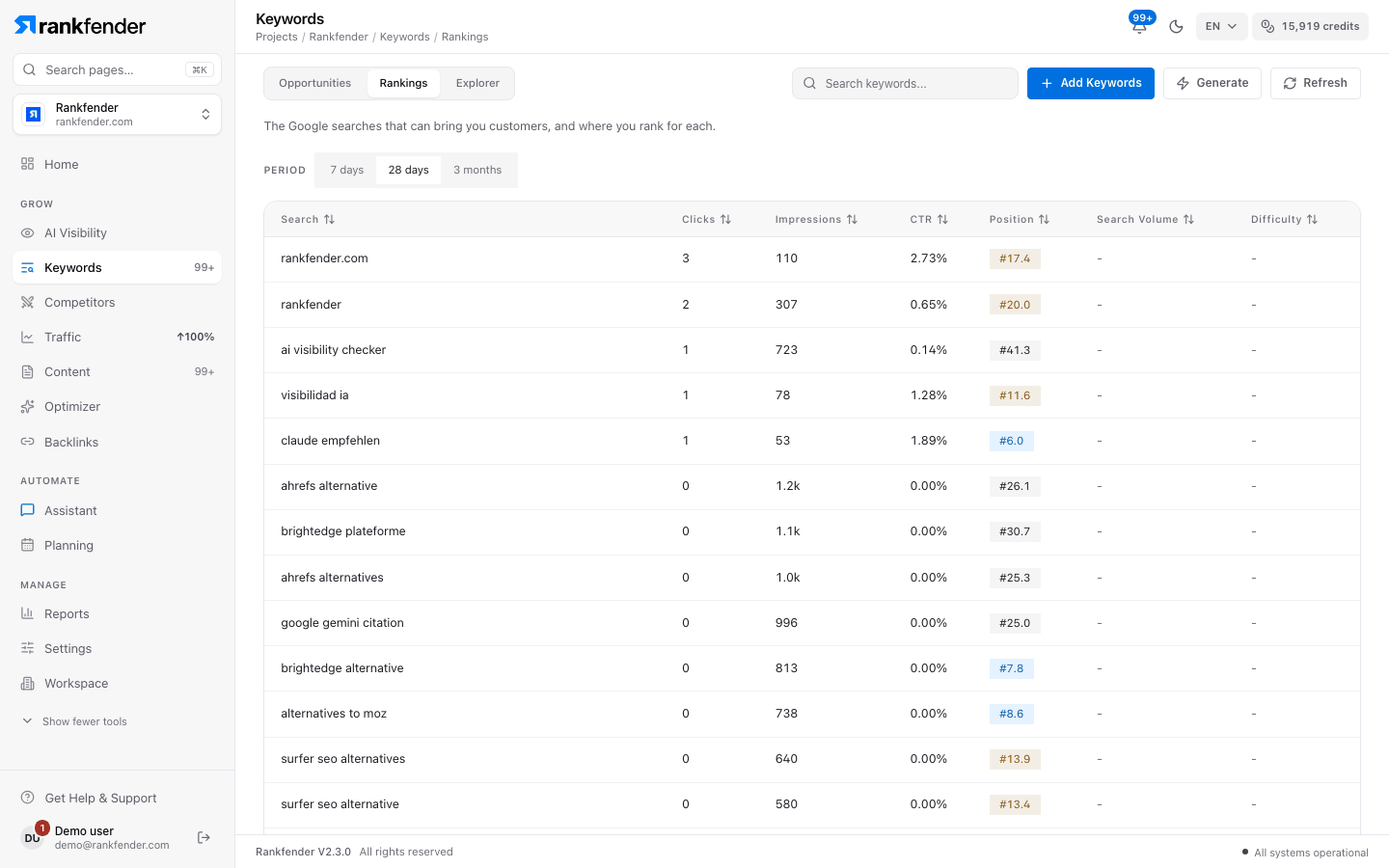
Rankings lists the searches where Google already shows your site, as Google Search Console reports them: clicks, impressions, click-through rate and average position for the period you choose.
Important
Rankings is Search Console data, not a rank tracker. It shows what Google reports for the chosen period. Rankfender does not check each keyword's position every day and keeps no chart of past positions.
What you need
Google Search Console connected to the project. The Google connection is part of Settings › Integrations Professional and up.
Open Settings › Integrations
On the Google card, press Connect.Sign in to Google
Choose the Search Console property of this site. Access is read-only.Wait for the first data
The tab says "Google sends data once a day — first rankings within 24–48 h". You don't need to stay on the page. "Sync now" asks Google again for the last 90 days.
Without a connection, the tab shows what you will see and a button to Settings › Integrations. Home's "Organic search" card works without Google: see Organic search and AI answers.
Period
Above the table, "Period" switches between 7 days, 28 days (the default) and 3 months.
The columns
| Column | What it means |
|---|---|
| Search | The words people typed when Google showed your site. |
| Clicks | How many times someone clicked your site for this search. |
| Impressions | How many times your site appeared in the results, even without a click. |
| CTR | Clicks divided by impressions. |
| Position | Your average position over the period, to one decimal. Green: top 3. Blue: 4–10. Orange: 11–20. Grey: further down. |
| Search Volume | Average monthly Google searches, added by Rankfender. |
| Difficulty | 0–100, added by Rankfender. Green up to 30, orange up to 60, red above. |
The tab lists up to 200 searches, sorted by clicks; click a column title to sort by it. Rankfender adds Search Volume and Difficulty for the first 100 searches; a spinner shows while they are measured.
Good to know
- Google sends data with a 2–3 day delay, so the most recent days always look lower.
- An average position blends every time you appeared: a few strong pages can hide many weak ones.
- The same Search Console position shows in Opportunities ("Your position") and in a keyword's panel ("Google Search Console · 28 days").
- For the pages behind each search, use Traffic › Search: see Search.
- Reading Search Console uses no credits. Adding Search Volume and Difficulty is a keyword measurement and uses credits.