Competitors in AI answers
Share of voice for you and your tracked competitors in AI answers: how each column is computed, adding a competitor and setting positioning.
The "Competitors" tab compares you with the competitors you track, using the same AI answers. It counts only answers to questions that don't contain your name, so a question that names you cannot flatter the comparison.
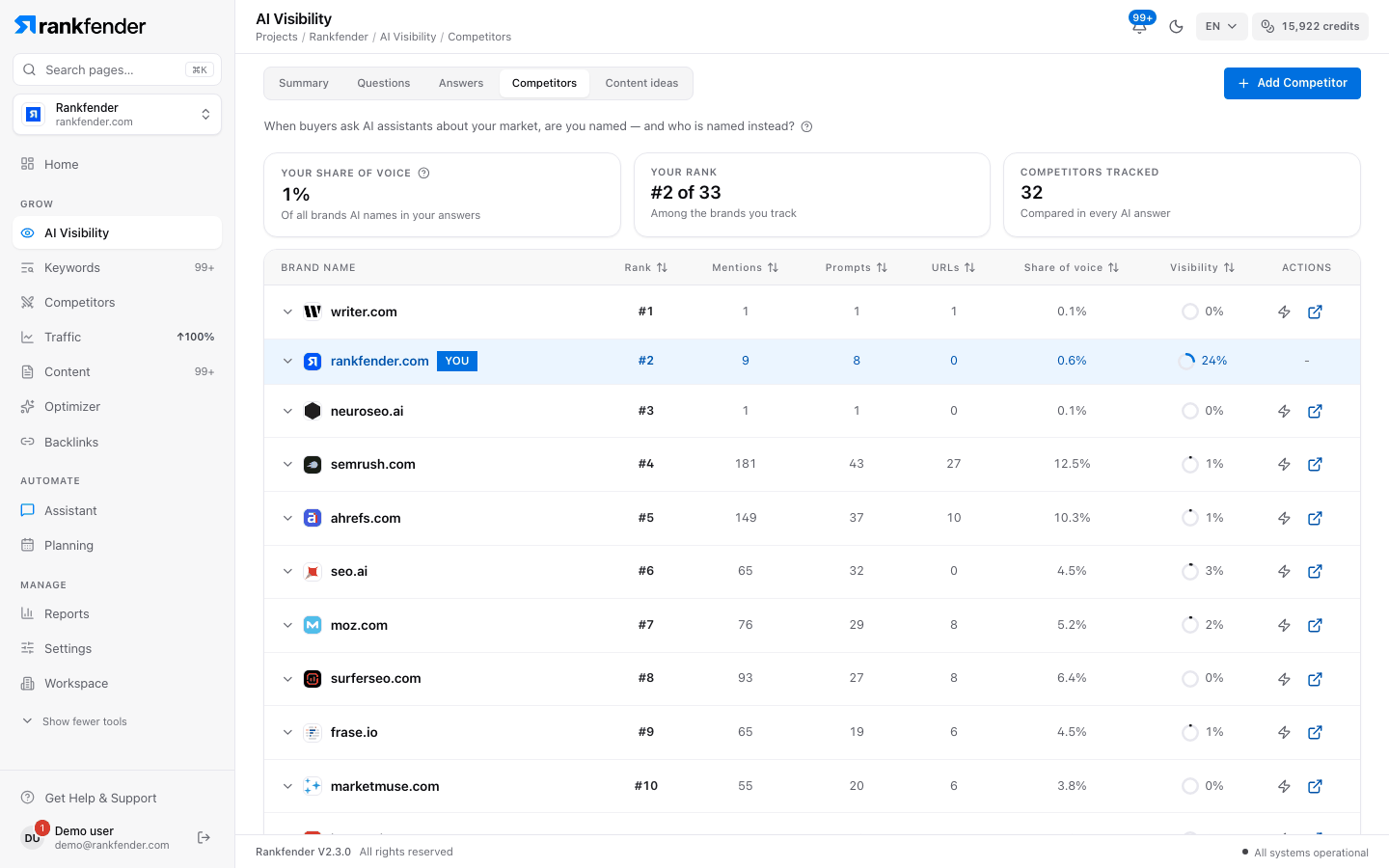
The three numbers at the top
- "Your share of voice": "Of all brands AI names in your answers", the share that is you. "Not named by AI yet" until you are named once.
- "Your rank": for example "#2 of 5", "Among the brands you track".
- "Competitors tracked": "Compared in every AI answer".
The comparison table
One row for you and one for each competitor you track. Click a column title to sort.
| Column | How it is computed |
|---|---|
| "Mentions" | Answers to questions without your name that name this brand. |
| "Prompts" | How many different questions those answers come from. |
| "URLs" | Answers whose sources include this brand's domain. |
| "Share of voice" | This brand's mentions divided by the mentions of every brand in the table. |
| "Visibility" | The average visibility score of the answers that name this brand (see Answers). For you it uses answers to questions without your name; for competitors, every answer that names them. |
| "Rank" | 40 % share of voice + 40 % visibility + 20 % position (100 divided by the average position, so #1 gives 100). |
| "Actions" | Set the positioning for that competitor (below). |
Open a row to see that brand's details: the "AI Systems" that named it, the "Sentiment" split and "Metrics" ("Total Responses", "Avg Visibility", "Avg. Mention Order").
Add a competitor
Click "Add Competitor"
The button sits at the top right of the Competitors tab.
Fill in the two fields
"Competitor Name" and "Website URL" are both required.
Confirm
Click "Add Competitor". The competitor joins your project's one competitor list, the same one the Competitors section uses, and every following AI check looks for it.
With no competitor yet, the tab says "No competitor named yet. Add 2 or 3 competitors you know." You can also add a brand found in the answers from Answers › "Brands Detected" › "Brands Explorer".
Competitive positioning
In the "Actions" column, "Set Positioning" opens "Competitive Positioning" for that competitor: "Your Strength", "Their Strength", "When to Choose You", "When to Choose Them", "Key Differentiator" and a "Positioning Category" (features, price, support, performance, ease of use, integration, security, scalability). "Save Positioning" stores it with the competitor. It is a reference for your team; AI checks and articles do not read it today.
Note
Summary › "Named instead" counts every brand named in the answers, tracked or not. This tab lists only you and the competitors you track. For a side-by-side view per competitor, see Competitors › AI answers.