Organic search and AI answers
The Organic search and AI answers cards, AI visibility over time, results by AI assistant, and the questions you win or lose.
The first pair of cards on Home puts your two audiences side by side: people who search on Google, and people who ask an AI assistant.
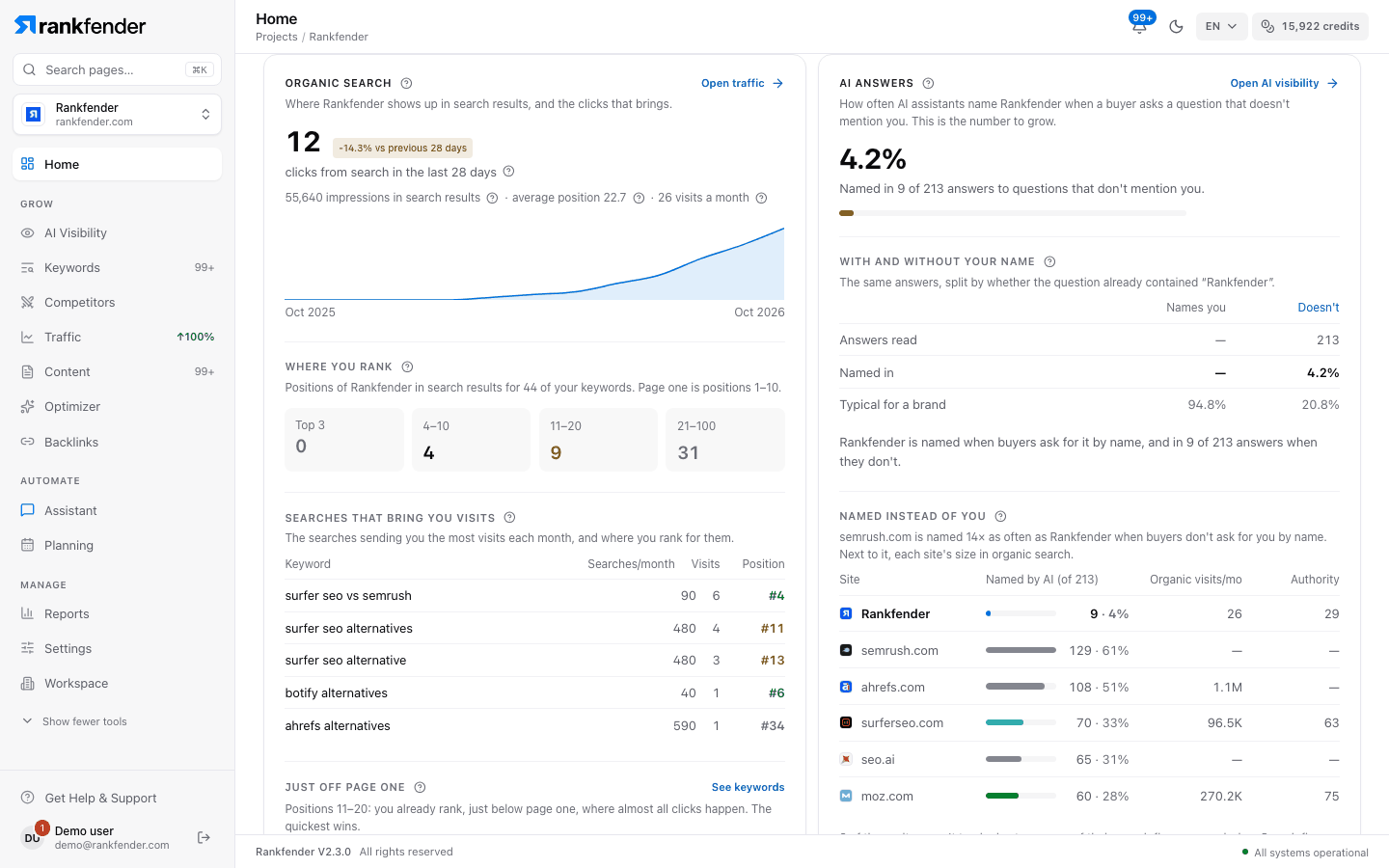
"Organic search"
Where your brand shows up in Google results, and the visits that brings. Rankfender measures this itself, so it works without any connection.
- "visits a month from Google", with the change over 12 months and a curve of the last months.
- "You appear for … searches, … of them on page one."
- "Where you rank": your keywords grouped by position today: "Top 3", "4–10", "11–20", "21–100". Page one is positions 1–10.
- "Just off page one": keywords in positions 11–20, the quickest wins.
- "Searches that bring you visits": the searches sending you the most visits each month.
With Google Search Console connected Professional and up, the card also shows your clicks from search in the last 28 days, impressions and average position. Right after connecting: "Search Console is connected. Your clicks and impressions arrive within 24–48 h." If Google stops sending data, the card offers "Reconnect Search Console". Buttons: "Open traffic" and "See keywords".
"AI answers"
How often AI assistants name your brand when a buyer asks a question that doesn't mention you. This is the number to grow. Rankfender matches your full brand name and its aliases, never single words.
- "… % AI visibility" and "Named in … of … answers to questions that don't mention you."
- Below 10 answers there is no percentage yet: "Too early for a score". Each AI check adds answers.
- "With and without your name": the same answers split by whether the question already contained your brand ("Names you" / "Doesn't").
- "Named instead of you" (or "Also named"): how often AI names each other site, next to its organic visits and authority. "Compare on Competitors" opens the full comparison.
"Open AI visibility" leads to the full answers: AI Visibility.
"AI visibility over time" and "By AI assistant"
These two cards appear once the first AI answers are in.
- "AI visibility over time": one point per week of checks, for questions without your name and with it. The line starts at the third week; hollow points rest on few answers and are a hint, not a result. "See every answer" opens the list.
- "By AI assistant": for each assistant, "Answers", "Named", "Rate" and when it was last "Checked". An amber dot means no answer in the last 14 days.
Note
The card lists the assistants selected for your project: up to 8 (ChatGPT, Claude, Gemini, Perplexity, DeepSeek, Grok, Llama and Mistral), depending on your plan.
"Questions you lose" and "Questions you win"
- "Questions you lose": open questions where AI named someone else, not you, with "Named instead:" and the brands it chose. Each one is a page worth writing; AI Visibility › Content ideas turns them into article ideas Professional and up.
- "Questions you win": questions where AI named you, with the "best position #…" you reached in the answer's list. Questions that already contain your name are tagged "has your name".