Link building plan
Set a monthly budget, choose 6 or 12 months and get a phased roadmap of links placed by our team. Business plan and up.
The Plan tab turns a monthly budget into a month-by-month roadmap of links, then lets you start it as a monthly subscription.Business and up
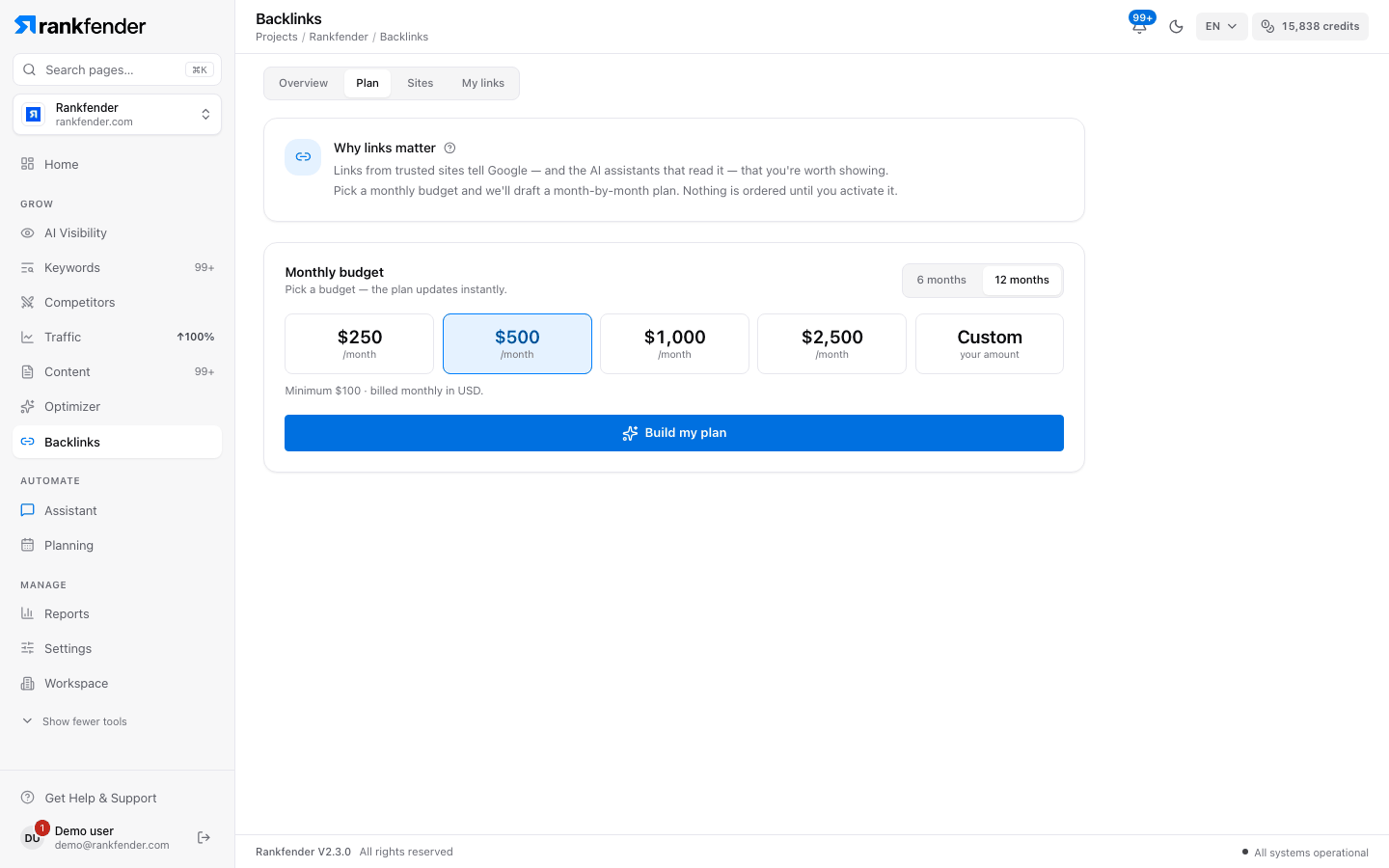
Build a plan
Pick a "Monthly budget"
€250, €500, €1,000 or €2,500 a month, or "Custom" ("your amount", from €100 to €10,000) and "Apply". The page shows "Minimum €100 · billed monthly in EUR." Amounts appear in euros or dollars, following your billing currency or your project's country.
Choose 6 or 12 months
The switch next to the budget reads "6 months" / "12 months".
Click "Build my plan"
"Choosing sites…": Rankfender ranks the available sites for your project, then drafts the months. After that, "Pick a budget — the plan updates instantly."
Read the plan
A "Strategy" card explains the plan in a few sentences, with three figures: "Links in the plan", "Total cost" and "Link pace" (links a month, marked "natural" or "fast"). Below it, one row per month:
| Phase | When | What it aims for |
|---|---|---|
| "Foundation" | First quarter of the plan | Mid-authority sites close to your topic, to build a natural base. |
| "Authority" | Up to the halfway point | Stronger sites that raise your ceiling. |
| "Scale" | Up to 80 % of the plan | A wider mix of sites and authority levels. |
| "Deep" | The last months | The widest mix, to keep growth looking natural. |
Open a month to see its sites, each with a fit score, its authority and its price. Approve (✓) or reject (×) the proposed sites, or "Edit website" to swap the site, the page it links to or the anchor type. Sites you pick on Sites with "Add to Roadmap" land in month 1.
How the plan is built
- Natural pace. New linking sites per month are capped at about 30 % of the sites already linking to you (at least 6), so growth looks natural to Google. The "Link pace" card shows it: "+N sites linking to you per month · natural".
- Variety. No site is used twice, and no more than 2 sites from the same category in a month.
- Anchor mix. Link texts are spread as brand 40 %, naked address 20 %, partial match 25 %, exact match 10 %, generic 5 %. The "Anchor mix" card shows the counts.
- Best value. Each month picks the best-scoring sites the month's budget can buy.
"Expected outcome" gives the number of sites linking to you you can expect after the plan: "~N referring domains after the plan."
Save and activate
Click "Save plan"
"At €500/month you'll get about N links a month. Saving creates a draft; nothing is ordered until you start the monthly subscription." The plan shows "Draft · not active".
Click "Activate"
Under "Not active yet", "Activate" opens a secure checkout for the monthly amount. Once paid, the plan is "Running" and the billing line reads "Billed monthly", with "Renews …" and the next invoice date.
A plan the Rankfender team runs for you shows "Managed by the Rankfender team: We choose, order and check every link for you. Nothing is charged here." Other statuses are "Paused" and "Ended". To change course, use "Change the budget or re-plan the remaining months".
Follow a running plan
The top of the tab sums up the plan, for example "€500/month · 12 months · Month 3 of 12 in flight", with the current window, then five tiles:
| Tile | What it shows |
|---|---|
| "Domain authority" | Your site's latest authority score and how much it moved in the last month that changed it. |
| "Links live" | Links that are live, with how many are in progress and still planned. |
| "Referring domains" | Sites linking to you at the start of the plan → now. |
| "Delivered value" | The value of the links delivered so far, out of what the plan foresees. |
| "Months" | Months started out of the total, with how many are closed and audited. |
Each month is "Upcoming", "In flight" or "Closed". "Refresh measurements" measures your profile again and rebuilds the audits of every started month. Month audits, link checks and closing a month are on My links.
Placed by people, checked on the live page
The plan is drafted by Rankfender from your budget, but every link is chosen, ordered and checked by the Rankfender team. Nothing is ordered until you activate the monthly subscription.
Note
Below Business, the Plan tab is not shown: the Backlinks page offers your link profile and the Business plan card instead.